

AI has become an important tool for professionals. For Salesforce Admins, Developers, and Business Analysts, using the right AI tools can be a major advantage. These tools automate common tasks, improve data analysis, and increase productivity.
This blog post explores the best AI tools for 2025 that can help you succeed in your role. We will look at built-in Salesforce solutions like Einstein AI and Agentforce. We will also look at third-party platforms like ChatGPT and GitHub Copilot. These tools help professionals to focus on important projects and deliver more business value.
AI Tools for Salesforce Admins

Salesforce administration is a foundational role, focusing on the management and maintenance of the platform. This position involves various responsibilities that can be made more efficient with the use of AI. Here are some AI tools designed to help Salesforce administrators improve their productivity.
1. Einstein AI
Einstein AI is the best tool for Salesforce admins. It is integrated with all Salesforce products and is built right into the platform. Einstein AI can analyse and clean CRM data, as well as deduplicate records, saving significant manual effort and increasing productivity. It can also be used with Agentforce to build predictive models that suggest next steps and solutions to users.
2. ChatGPT
ChatGPT is one of the top AI tools for administrators. It offers extensive AI capabilities. You can integrate ChatGPT into Slack as a chatbot and use prompts to get instant answers to questions and summarise documents. You can also receive help with various administrative tasks. This removes the need for tedious manual writing and research.
It can analyse a lot of Salesforce data to provide reports. These reports give detailed insights into customer behavior and performance. Organisations can use this feature to identify key trends, customise strategies, and make informed decisions.
3. Agent For Setup
Now you can leverage Agentforce’s capabilities to assist with your daily administrative tasks. Agent for Setup is a specialised AI agent template within Agentforce, designed to meet the specific needs of a Salesforce administrator.
This built-in agent can help you with a variety of tasks, such as troubleshooting user access issues, creating report types, and finding answers within Salesforce Help documentation.
You can access these features directly from the agent panel in Setup. By using this tool, you can optimise your time and accelerate the process of setting up your organisation for users.
Take the next step in your career. Enroll in our comprehensive Salesforce Admin course and learn how to leverage the latest AI tools to streamline your daily tasks and boost your career.
AI Tools for Salesforce Developers
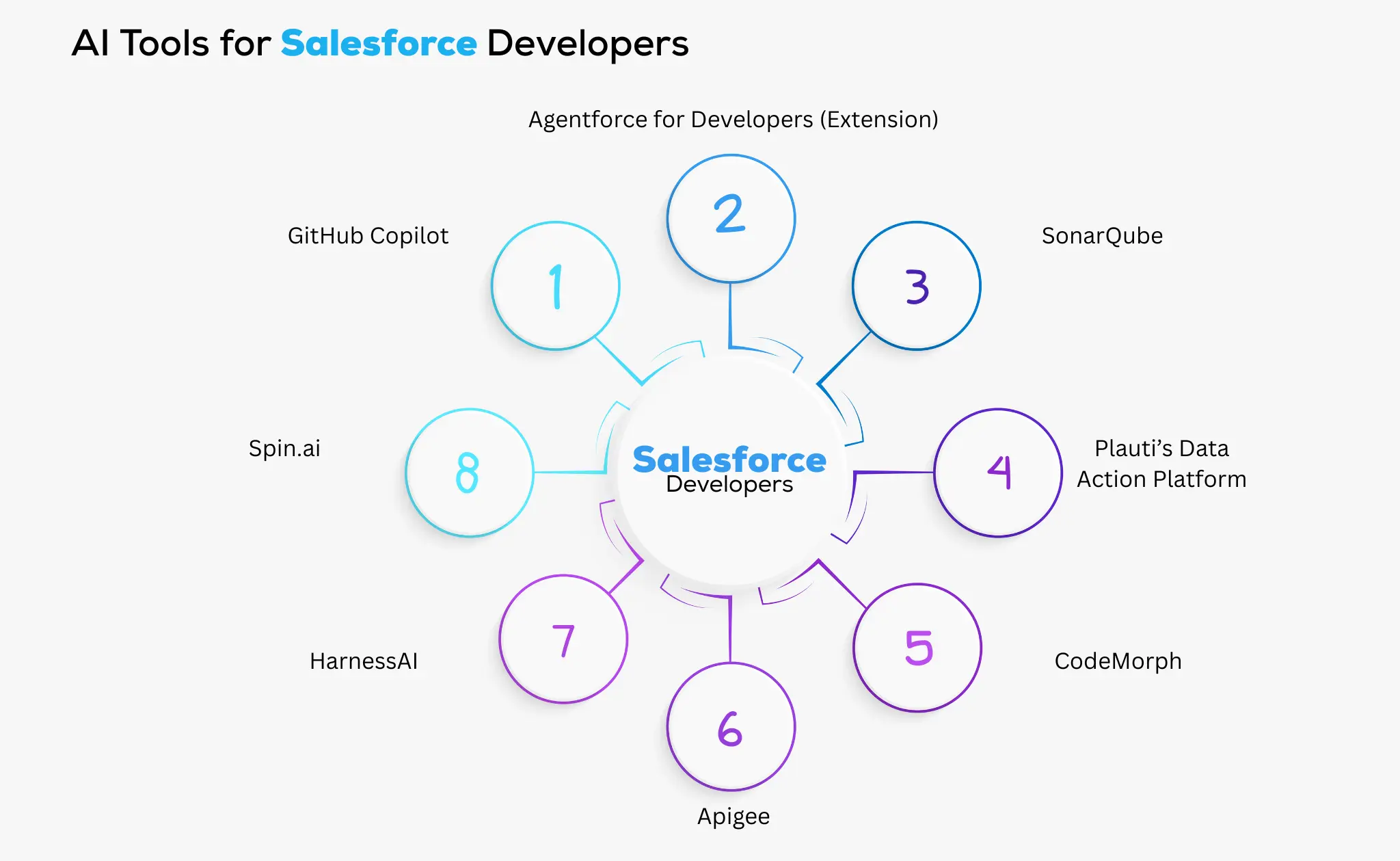
Salesforce developers have many responsibilities, like writing new applications and maintaining the accuracy of existing systems. By using AI tools to automate repetitive processes like code reviews, they can save development time and increase productivity.
1. GitHub Copilot
GitHub Copilot is a powerful AI tool for Salesforce developers. It acts as a “pair programmer,” instantly suggesting code as you type. Due to its understanding of both JavaScript and Apex, the tool can identify inefficient code and provide optimised alternatives in real time.
This functionality significantly reduces manual typing and context switching, saving developers valuable time.
Manual coding often involves repetitive tasks like recalling function names or arguments. GitHub tool eliminates up to 80% of manual typing and enhances productivity. According to its website, 88% of developers who use GitHub Copilot report feeling more productive, making it a valuable tool for increasing efficiency.
2. Agentforce for Developers (Extension)
Agentforce for Developers is an AI-powered tool designed to boost developer productivity. Available as a Visual Studio Code extension, it helps you generate code and provides real-time suggestions as you type.
The extension is built using Salesforce’s secure, custom AI models, CodeGen, and SFR Model. These models have been trained on anonymised code patterns to provide expert assistance throughout the Salesforce development process.
You can find the Agentforce for Developers extension in the VS Code and Open VSX marketplaces as part of the Salesforce Extension Pack, as well as within the VS Code desktop application and Code Builder.
3. SonarQube
Developers often spend a lot of time on manual code reviews and security checks. SonarQube is an AI-powered scanner that automates this process and boosts consistency and efficiency. This tool scans your codebase in a flash to find errors, bugs, or inefficiencies that a human review would miss.
This automated review happens in seconds, freeing developers to focus on building new features. Its AI Code Assurance feature also puts strong quality checks in place, proactively identifying problems in code created by other AI tools, so you can use them with confidence.
4. Plauti’s Data Action Platform
Plauti’s Data Action Platform is an AI tool for developers that automates data management in Salesforce. It uses AI to analyse data quality, identify duplicates, and suggest data cleansing actions. This helps developers maintain clean and accurate data. It leads them to better decision-making and improved CRM performance.
5. CodeMorph
CodeMorph is an AI assistant for Salesforce developers that works in real time to help with coding tasks. It can rewrite existing code or convert it to new frameworks for faster deployment. The tool also updates legacy code to modern standards, saving you time on manual conversions.
6. Apigee
Apigee, an API management platform by Google, is a useful tool for Salesforce developers. It simplifies the creation and management of APIs by automatically generating specifications and test flows. The tool also handles documentation, test cases, and API call creation, while suggesting improvements to enhance accuracy and efficiency.
Developers can use this tool to manage and secure Salesforce APIs and integrate Salesforce with other systems. The platform includes features such as rate limiting, quotas, analytics, and usage monitoring. These features help developers efficiently manage consumption and offer insightful information about API performance.
7. HarnessAI
For developers who use CI/CD pipelines, HarnessAI is a recommended tool. It automates the building and deployment steps in continuous integration. This AI-powered tool can automatically trigger test suites and eliminate the need for manual testing.
It can also detect failed builds and suggest rollback plans, and ensure continuous and error-free deployments.
8. Spin.ai
Spin.ai automates data integration and synchronisation within Salesforce. It maps fields, analyses data sources, and automates data transformations using AI. It ensures data consistency across several systems and streamlines the procedure.
It also offers an extensive range of security features, such as data leak prevention, ransomware protection, and backup.
Transform your coding skills. Our Salesforce Developer course teaches you how to build innovative applications and harness the power of AI tools.
Also read: Can the age of AI replace Salesforce Developers?
AI Tools for Salesforce Business Analyst

A Salesforce Business Analyst’s role involves many tasks, from meetings and coordination to communicating with stakeholders, all of which require speed and intelligence. To help you maintain a fast pace and work smarter, here are some AI tools that can assist business analysts.
1. Tableau
Tableau is a visual analytics platform from Salesforce. It is an essential AI tool for business analysts. It uses historical data to predict future trends, risks, and opportunities. It helps users gain deeper insights.
Rather than manually creating spreadsheets, analysts can input CRM metrics and let Tableau generate trends and risk factors. This tool can transform raw data into interactive dashboards and reports, enabling business analysts to make more informed decisions and drive better business outcomes.
2. Power BI
Power BI is a widely used tool for data analysis and business intelligence among Salesforce Business Analysts. The AI capabilities of Power BI can now automate the process of creating analytics reports. The AI drives everything from dashboards to data categorisation for both structured and unstructured data.
It transforms raw data into actionable insights, empowering organisations to make more informed, data-driven decisions.
3. Otter.ai
Otter.ai is an effective tool for professionals who manage frequent client meetings and team sprints. This tool takes notes and performs real-time transcription for Google Meet and Zoom.
For Salesforce business analysts, capturing every detail from stakeholder meetings is essential. By transcribing conversations into searchable and shareable notes, Otter.ai streamlines this process. It gives a summary of the key points and makes sure that no important details or next steps are overlooked.
4. Figma
Figma is a web-based design and prototyping tool. It is known for its collaborative features and ease of use, making it ideal for creating prototypes.
BAs can use Figma to create visual designs, wireframes, and interactive prototypes for Salesforce applications. This helps them visualise user interface (UI) and user experience (UX) concepts before development begins. It improves communication, collects input from stakeholders, and expedites the process of design handoff.
5. MonkeyLearn
As a Business Analyst, clear communication is crucial, but sometimes a customer’s true intent gets lost in corporate jargon. MonkeyLearn helps with this by analysing the sentiment in reviews, surveys, support tickets, and emails. This allows you to get faster data insights without having to read through hundreds of comments.
Customised text analysis can be created using MonkeyLearn’s simple graphical user interface. To learn more about what your consumers are actually saying, you may train machine learning models for tasks like sentiment analysis, topic recognition, and keyword extraction.
6. DataRobot
Designing and maintaining implementation strategies is a critical part of a business analyst’s role. DataRobot is an AI tool that can help you make data-driven business decisions. It analyses your CRM data and uses AI to recommend strategic changes to your development or implementation plans to maximise your return on investment (ROI).
7. JIRA
Jira is a versatile project management tool. It efficiently manages tasks, user stories, requirements, and bugs. You can create these items as “issues,” adding a description and assigning them to team members. Jira offers customisable workflows that you can tailor to your project’s needs at different stages.
Refine your analytical expertise. Enroll in our Salesforce Business Analyst course, which focuses on practical applications of AI tools.
Also read: The future trends of Salesforce Business Analyst.
Conclusion
The integration of AI tools is revolutionising the Salesforce ecosystem and empowering Admins, Developers, and Business Analysts to work smarter and more efficiently. By embracing tools like Einstein AI, GitHub Copilot, and Tableau, you can automate repetitive tasks, gain deeper insights, and accelerate project delivery.
With new tools and features arriving frequently, the world of AI constantly evolving. To stay competitive, it is crucial for Salesforce professionals to continuously explore and adopt these technologies. Investing in AI-powered solutions is about unlocking new levels of productivity and achieving sustainable business growth in the digital age.








 Google